

Data Privacy
Your data stays yours
Documents, conversations, and data are stored within your organization’s environment. Generate does not use your data to train AI models.
Multi-tenant isolation
Each organization’s data is fully isolated. No data leaks between tenants.
Access Controls
Role-Based Access
Every user has a role that determines what they can do:| Role | Access Level |
|---|---|
| Admin | Full access to all features and admin panel |
| Member | Standard access to chat, agents, projects, and knowledge base |
| Viewer | Read-only access |
Team-Based Permissions
Organize users into teams with specific permissions. Control which features, projects, and data each team can access.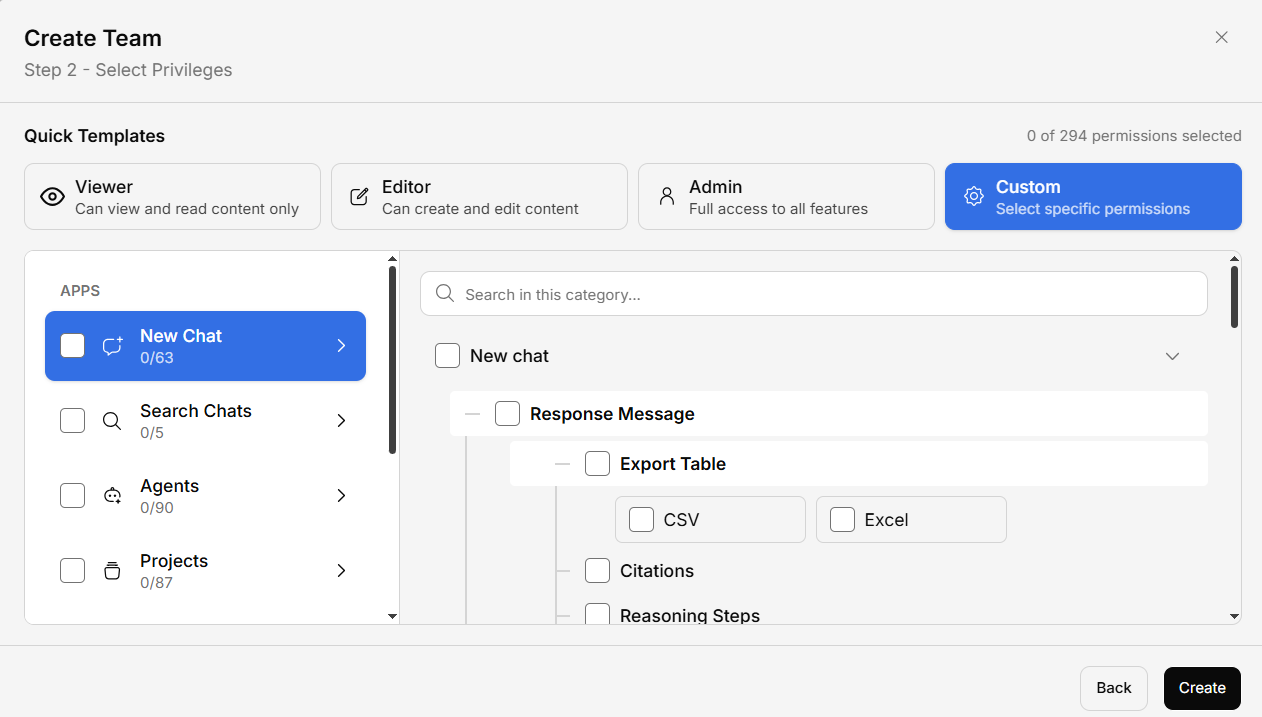
Authentication Security
- Two-Factor Authentication (2FA) — OTP verification for additional security
- Session management — Secure, time-limited sessions with automatic expiration
- Login attempt tracking — Monitor and control login attempts
Encryption
- In transit — All data is encrypted using TLS/HTTPS
- At rest — Stored data is encrypted in the database and file storage
Feature Flags for Security
Administrators can use the feature flag system to:- Disable specific input methods (file upload, voice, web search)
- Restrict export capabilities
- Control which connectors are available
- Limit access to specific features per user group